Trial Balance Report
Reporting → Financials
Purpose
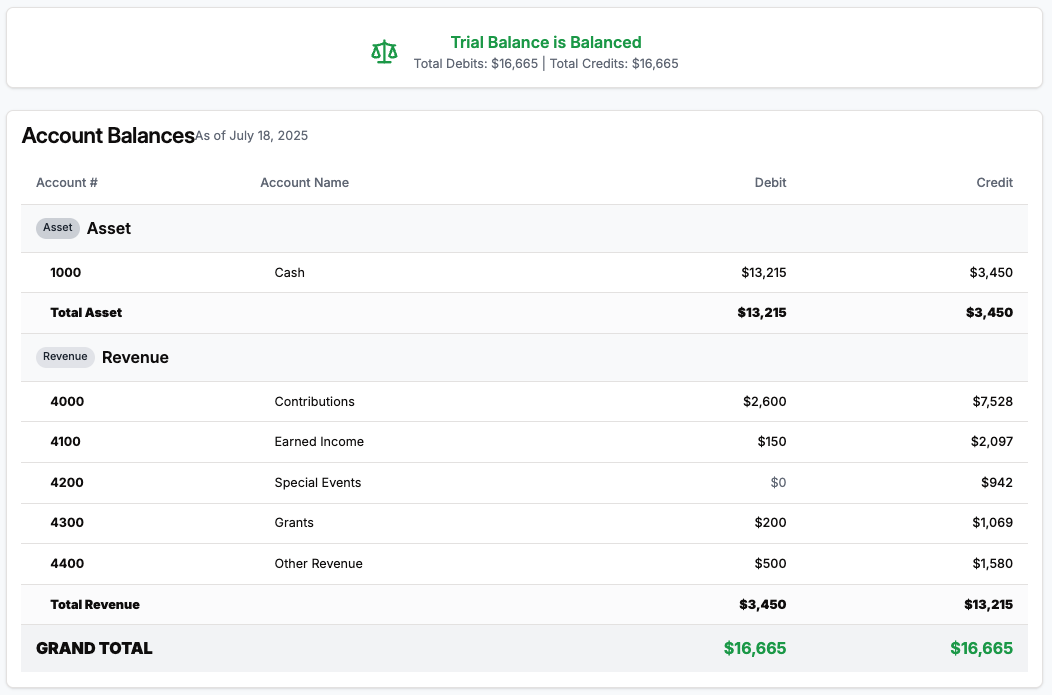
The Trial Balance is your one‑page reality check that debits equal credits across all account types (Assets, Liabilities, Revenue, etc.). It’s the report bookkeepers pull before closing a period—or exporting data to QuickBooks—to confirm nothing is out of balance.
Report Layout
| # | Section | What It Shows |
|---|---|---|
| 1 | Filters | As of Date picker. Trial Balance is a point‑in‑time snapshot, not a date range. |
| 2 | Balance Banner | Green Balanced badge if total debits = credits; red Out of Balance badge otherwise (shows difference). |
| 3 | Account Balances Table | Grouped by Account Type (Asset, Revenue, etc.). Columns: • Account # – your GL code. • Account Name. • Debit – ending debit balance. • Credit – ending credit balance. |
| 4 | Balance Verification | Quick recap of Total Debits, Total Credits, and Difference. Mirrors banner for clarity. |
| 5 | Actions | Refresh to recalc after posting entries, Export to CSV/Excel. |
How Balances Are Calculated
- System sums all journal entries up to and including the selected As‑of date.
- Net debit or credit per account is displayed in the appropriate column (zeroes hidden for readability).
- Totals at the bottom verify debits equal credits (double‑entry check).
Note: Currently only Asset and Revenue accounts appear because expenses and liabilities are coming in a future release.
Running the Report – Step‑by‑Step
- Navigate → Financials → Reports → Trial Balance.
- Pick the As‑of Date (defaults to today).
Tip: choose month‑end for reconciliation. - Click Refresh to generate the snapshot.
- Check the Balance Banner—green means you’re good; red difference indicates unposted or mismatched entries.
- Scroll the table or Export for your accountant.
Spotting Issues
| Symptom | Likely Cause | Next Step |
|---|---|---|
| Out‑of‑balance by small amount (e.g., $0.01) | Rounding on partial refunds or fees | Run Journal Entries report; search for odd‑cent values. |
| Large imbalance | Manual journal import or back‑dated entry | Filter Journal Entries for today’s date; review recent imports. |
FAQ
Does the Trial Balance include future‑dated charges?
No—only entries dated on or before the As‑of date are accumulated.
Why don’t I see Expense accounts?
Expense & Liability accounts will arrive with the Expense & Budget Tracking release. For now, focus on Assets & Revenue.
Can I change the order of account groups?
Groups are ordered by traditional chart‑of‑accounts sequence (Assets, Liabilities, Equity, Revenue, Expense). This will expand as more account types go live.